Posted: August 3rd, 2014 | Filed under: Software, Tutorials | Tags: dropbox, folder, move, Ordner verschieben | No Comments »
Da meine Windows-Partition lediglich 64GB (ist ne SSD) aufweist und auf derselbigen meine Dropbox mittlerweile 52GB groß sein darf, muss ich meinen Dropbox-Ordner notgedrungen von C:/ auf D:/ verschieben. Für diesen Fall bietet Dropbox eine eigene Funktion, die ihr wie folgt ausführen könnt.
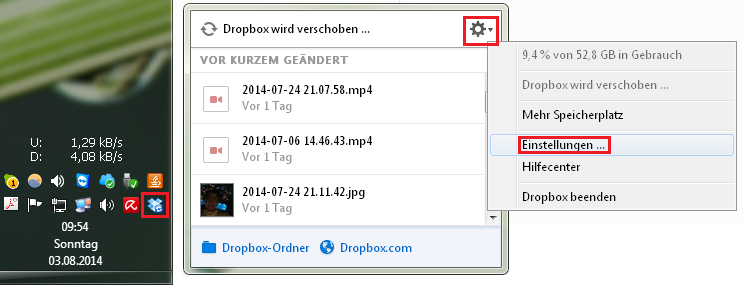
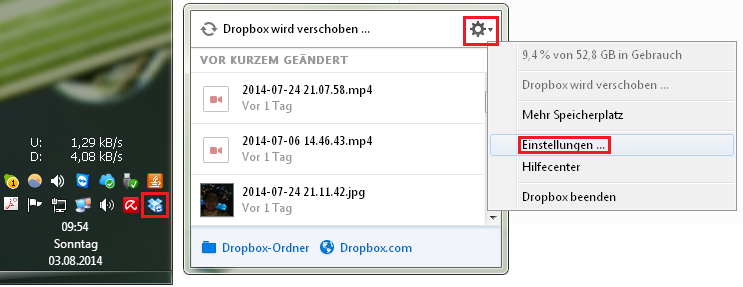
Einstellungen
Zuerst klickt ihr euch zu den Einstellungen.
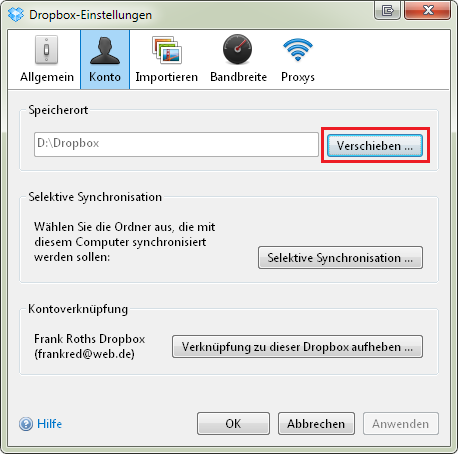
Verschieben
Klickt dann auf den Button, neben dem Speicherort-Feld, mit der Aufschrift Verschieben…
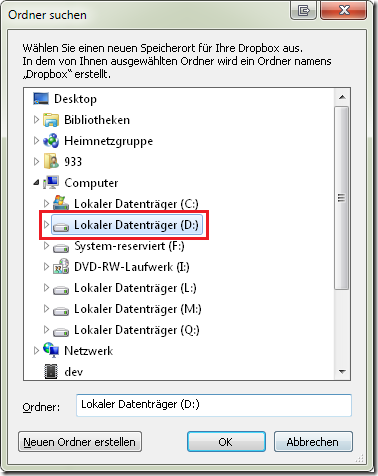
Neuer Ordner Wählen
Nun wählt ihr einen neuen Eltern-Ordner. Wenn ihr euren Dropbox-Ordner in D:\Dropbox anlegen wollt, dann reicht es das Laufwerk D: auszuwählen.
Warten
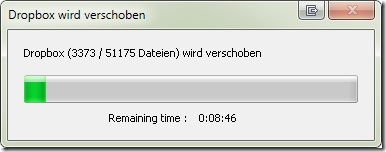
Nun verschiebt Dropbox all Eure Dateien. Das kann eine Weile dauern…
Fertig

Posted: Mai 29th, 2014 | Filed under: Java | Tags: css, Java, JavaFX, JavaFX8, progress-bar, styling, Tutorial | 3 Comments »
In my opinion the JavaFX CSS Reference Guide is not well elaborated. With the help of screenshots and concrete examples it would be much easier to understand the explanations. Therefore I started https://github.com/frankred/JavaFX-Tutorials to give you some examples for specific components.
In the following post the progress-bar component is introduced.

.progress-bar {
    -fx-background-color: yellow;
    -fx-background-radius: 10, 10, 10, 10;

}

.progress-bar .track{
    -fx-background-color: green;
    -fx-background-insets: 20;
    -fx-background-radius: 6, 6, 6, 6;
}

.progress-bar .bar {
    -fx-background-color: grey;
    -fx-background-insets: 30, 30, 30, 30;
    -fx-background-radius: 4, 4, 4, 4;
}
Feel free to copy and paste everything!
Posted: Mai 13th, 2014 | Filed under: Betriebsysteme, Linux, Tutorials | Tags: auslesen, coretemp, CPU, debian, Fedora, lm_sensors, lm-sensors, redhat, Temperatur, Ubuntu | 1 Comment »
Das Tool welches euch das Auslesen der CPU-Temperatur ermöglicht heißt: sensors. Installieren könnt ihr es unter Ubuntu (oder anderen Debian-basierten Systemen wie folgt).
Installation
Debian / Ubuntu
sudo apt-get install lm-sensors
RedHat / Fedora
Unter RedHat oder Fedora unterscheidet sich der Installationname der Applikation ein wenig:
yum install lm_sensors
CPU Temperatur auslesen
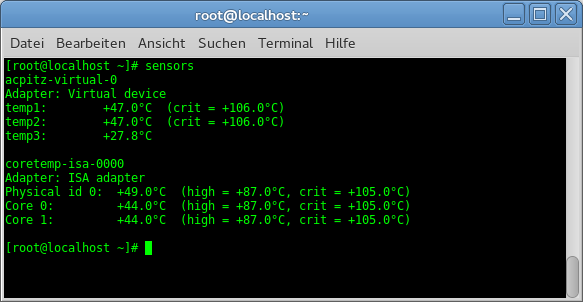
Starten könnt ihr das Tool mit folgendem Befehl:
sensors
Posted: April 26th, 2014 | Filed under: Betriebsysteme, Linux, Tutorials | Tags: Fedora, Fedora 20, installieren, Java, Java7, Java8, JDK, OpenJDK alternative, Oracle, rpm, rpm -i, update-alternatives | No Comments »
Da das OpenJDK standardmäßig kein JavaFX implementiert und mir der Aufwand zu groß war mir ein OpenJDK inklusive JavaFX selbst zu bauen, hier eine kleine Anleitung wir ihr Oracles JDK auf Fedora installiert und aktiviert.
Herunterladen könnt ihr euch das JDK hier: http://www.oracle.com/technetwork/java/javase/downloads/index.html
Achtet darauf dass ihr das entsprechende RPM-Paket herunterlädt. Via Konsolenbefehl (zum Beispiel) oder per Doppelklick auf das RPM-Symbol:
rpm -ivh jdk-7u55-linux-x64.rpm
Könnt ihr das Paket installieren. Anschließend befindet sich euer Java JDK in folgendem Ordner:
/usr/java/jdk1.7.0_55/
Jetzt müsst ihr die entsprechenden Java-Befehle verlinken:
update-alternatives –install „/usr/bin/java“ „java“ „/usr/java/jdk1.7.0_55/bin/java“ 1
update-alternatives –install „/usr/bin/javac“ „javac“ „/usr/java/jdk1.7.0_55/bin/javac“ 1
update-alternatives –install „/usr/bin/javaws“ „javaws“ „/usr/java/jdk1.7.0_55/bin/javaws“ 1
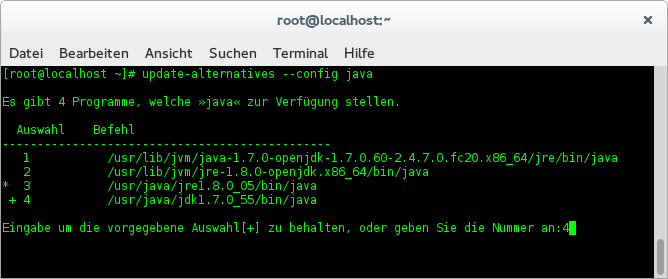
Schließlich könnt ihr eure eben hinzugefügtes JDK wie folgt aktivieren:
update-alternatives –config java
Posted: April 1st, 2014 | Filed under: Allgemein, Java, Programmieren | Tags: Apache Lucene, Java, JavaFX, JavaFX2, JavaFX8, jSona, VLCJ | 4 Comments »
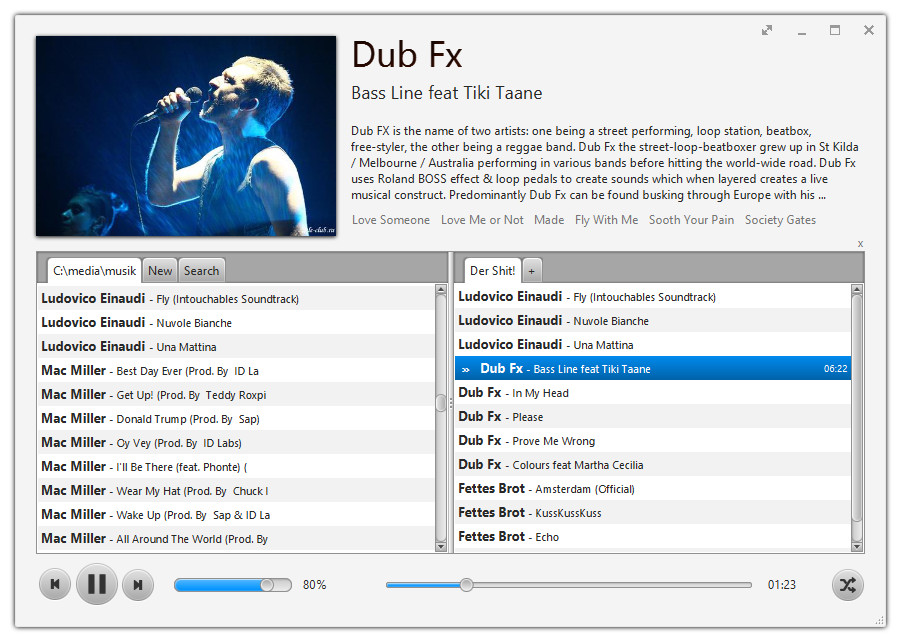
Hey, today I want you to introduce my new project that is called jSona. It is based on JavaFX, Apache Lucene and vlcj. I developed jSona because I found no music player that keeps in synch with my music folders and fits my needs. Because I just launched this project it has not that many features:
- Supports all common media formats that VLC supports
- Load artist information and images via last.fm and MusicBrainz
- Include your music folders
- Create multiple playlists
- Fulltext search
I tried to make a good looking, simple to use and clean user interface. All artist information like an image, the vita or the top tracks is loaded via the great Last.fm API. If you click on the top tracks then YouTube will be opened with a correspondent search query. The heart of the music player is a JSON-based configuration file where I will try to keep everything configurable, so that jSona also fits your needs.
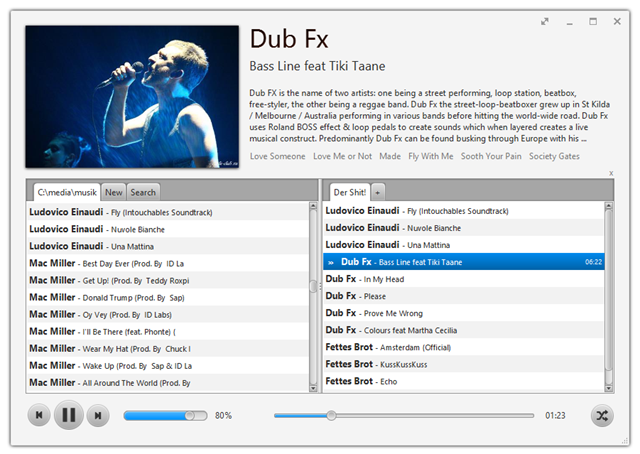
It would be great if someone want to join me in development. Here you can download a current version of jSona, https://github.com/frankred/jSona.
 Ein Karlsruher Bloggt!